Recent Entries
ArchivesQuicksearchLinks |
RSS Feeds    
Stumbleupon This Site! 
 Save to del.icio.us Save to del.icio.us
CategoriesLinoleumError on line 141 of /var/www/iomem/bundled-libs/Onyx/RSS.php: The specified file could not be opened. (#404) |
Checking out Opensolaris 2008.05
Sunday, July 20. 2008

Author: Paul Dwerryhouse <paul@dwerryhouse.com.au>
OpenSolaris 2008.05, Sun's community-developed open-source Solaris distribution, was released in May of this year, to much fanfare. While I began my system administration career in the Solaris field, I've found myself more and more in the Linux arena in the last few years, and haven't had a good look at Sun's flagship product since back in 2005, when Solaris 10 was released. With this in mind, I decided to pull down an ISO and see just how much going open-source has improved the product.Package Management
Critics of Solaris's package management system have a little bit to cheer them up; although OpenSolaris still uses the same cryptic, inflexible system that Solaris always has, it does have a new graphical and text frontend.
Alas, the graphical frontend is next to useless; poorly designed, slow and quite painful to use. I stuck with it for about five minutes, until I realised that it was nowhere near flexible enough for my needs. It didn't even appear capable of showing information about packages that were available in the repository, but not yet installed, which - to me - appears to defeat the purpose of having a package manager at all.
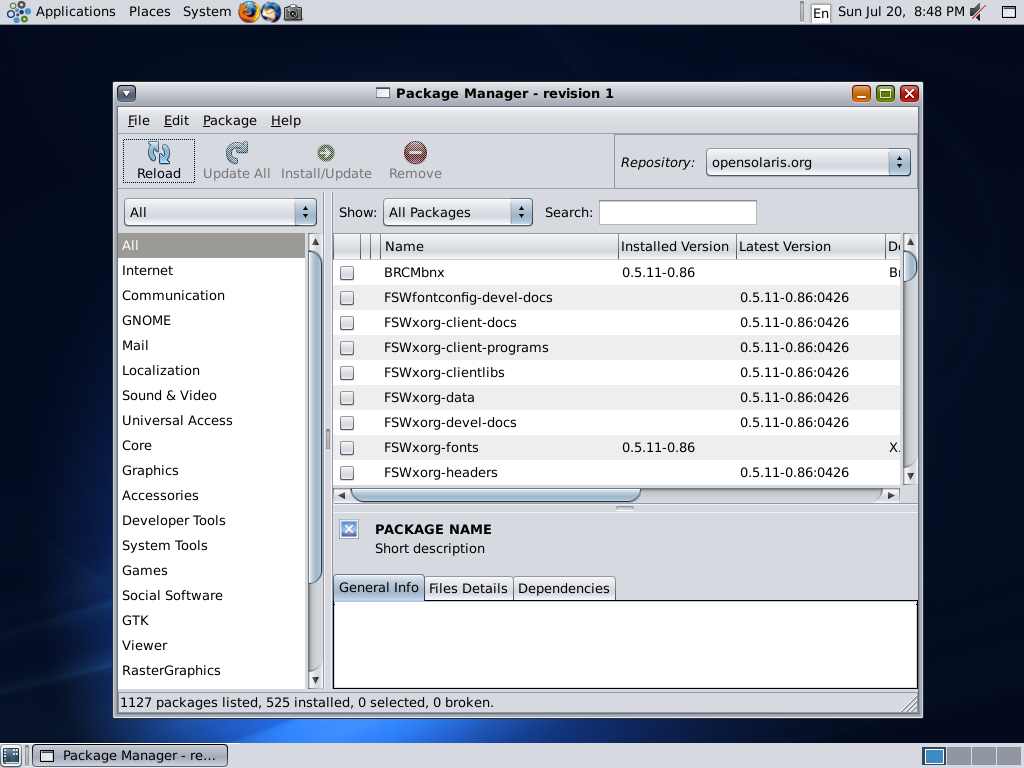
The new command-line frontend, however, is a definite improvement upon the regular Solaris packaging tools. Installing and updating packages is simpler than ever before - almost Debianesque. Almost. The tool is clearly powerful - but is, unfortunately, rather needlessly complex. Just getting a listing of the contents of one package requires this:
pkg contents -t dir,file,link,hardlink -o action.name,mode,pkg.size,path,target SUNWzfs
Compare this to the simplicity of 'dpkg -L' under Debian, or 'rpm -ql' under Redhat.
Where it really shines, however, is its ability to integrate package upgrades with zfs, and perform them within a snapshot of the existing system. This, called an image-upgrade, allows the system administrator to backout of an upgrade easily, if necessary. And it certainly came in handy, when an issue with the upgrade process caused my server to become unbootable; going back to the original installation image fixed this easily.
Zones
Solaris Zones are a simple, low-overhead approach to virtualisation. If you've ever played with Xen under Linux, you'll know just how painful it can be to set up. It took me only 25 minutes to get a working Solaris Zone up and running, from scratch, with no prior experience in having done this.
It's even possible to create a zone as a ZFS clone of the host operating system, so that the guest zone uses very little space at all - the only extra space used is that which needs to be different from the host.
The light overhead of Solaris zones comes at a price however - not all operations are allowed within a guest zone, and certain kernel operations (even something as simple as mknod) won't work.
Conclusion
There's a lot to like about OpenSolaris 2008.05, especially if you've come from a Solaris background. If, on the other hand, you've come from a Linux background, you may find yourself fairly unimpressed with the various niggles, lack of drivers and annoyingly old set of command-line tools. Nevertheless, I found that OpenSolaris is a marked improvement upon Solaris 10, and especially from a server point of view, and look forward to seeing its features rolled out in the forthcoming Solaris 11.
If you found this article helpful, consider making a donation to offset the costs of running this server, to one of these addresses:
Related Links:
Comments
Display comments as
(Linear | Threaded)
Last time I checked, I had problem starting OpenSolaris in Qemu.
I wonder if it is better now.
I wonder if it is better now.
Hi wsh, thanks for the comment.
I had trouble with OpenSolaris in qemu too (and similarly, had problems with it in VirtualBox). I can confirm, however, that it definitely works very well under the free VMware server.
Cheers,
Paul.
I had trouble with OpenSolaris in qemu too (and similarly, had problems with it in VirtualBox). I can confirm, however, that it definitely works very well under the free VMware server.
Cheers,
Paul.
This is very out of date now go to opensolaris.org and down load the latest release 06:2009. Its a killer OS in the enterprise market or your desktop! Itits updated every month with supported releases every 6 months. The webs best kept secret! Try it....
#2
on
2009-07-19 05:24
Sanni M'Mairura, cheap toms shoes Rachel Hale, Briana Oakley mix exclusive content along with potent w longchamp pas cher oices on'American Idol' Wednesday March Thirty, The year 2013 Ten:16 Evening By simply Jamshid Mousavinezhad Pics credit ratings: Monk American Idol uncovered some out of the ordinary stars during San Antonio is without question this King Margaret during Lengthy Bch, Calif., asSanni M'Mairura, Rachel Hale, Briana Oakley, Micah Velupe,Adam Sanders together with He Player combine chaussures louboutin pas cher erectile dysfunction distinct stories along with effective voice overs Louis Vuitton Sito Ufficiale Borse .Below's the way i positioned all of them; add your thoughts inside the observations, under.1) Char michael kors sale ismatic Sanni M'Mairura , where mother's by Tanzania and additionally...
Tracked: Jul 25, 07:29